
archiTweaks
Focus on the views that matter: hide folders or specific views in the View Map, generate entire Layout subsets in bulk from a CSV, align drawings across Layouts in one Sync Group, and bulk re-link placed drawings without redrawing them.
Some of what it can do.
Inside the workflow.
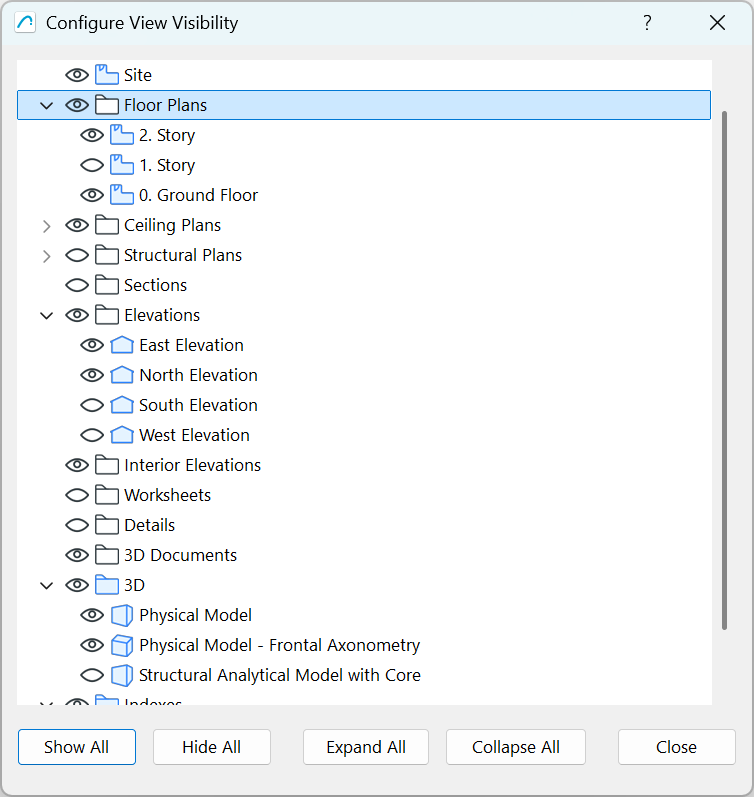
Configure View Visibility: toggle entire folders or individual views on/off with the eye icon to declutter your View Map.
archiTweaks palette: a clean, filtered view of your project with search, place, and link tools at the bottom.
To be added soon.
To be added soon.
To be added soon.
To be added soon.
System Requirements
Try archiTools Core for €61/mo
Includes archiVisora credits, every add-on, every update, priority support.
Only need the Archicad add-ons? archiTools Atelier is €40/mo.
View pricingQuestions, answered.
Does hiding views delete them from my project?+
No. Hidden views disappear only from the archiTweaks palette: they stay in your actual Archicad View Map untouched. Toggle the eye icon to bring them back anytime.
Which Archicad versions are supported?+
Archicad 27, 28, 29, and 30 on Windows 10/11 or macOS 14+.
Can I place drawings on Layouts from the palette?+
Yes. With a Layout active in Archicad, select a view in the palette and click Place: it drops onto the Layout as a drawing without going through the Navigator.
Can I re-link an existing drawing to a different view?+
Yes. Select a placed drawing, pick a different view in the palette, and re-link. Cropping, scale, and position are preserved, no need to delete and re-place.
How do I get a north arrow that follows the drawing on a Layout?+
archiTweaks comes with two objects, archiNorthTitle (a drawing title with a north arrow) and archiNorthArrow (an arrow you put next to any drawing). They are in the Library Manager under the built-in libraries as soon as archiTweaks is installed, with no library to load. archiTweaks keeps them pointing north whatever the rotation of the view or of the drawing on the sheet. ArchiTools > archiTweaks > Place North Arrows puts an arrow by every floor plan drawing of the Layout on screen; the North Arrows tab does it for many Layouts at once. Available in Archicad 28, 29 and 30.
Is there a free trial?+
Yes: a free 7-day trial of the full add-on, started from inside Archicad once you sign in. Cancel the full subscription anytime; you're only billed for months used.